
Best OnlyFans management software: how to choose
The best OnlyFans management software for your agency depends on four things: which platforms your models are on, how much each account earns, how you pay chatters and how much of the shift you want to see while it runs. Below: the checks to run before you pay, and five tools side by side, based on their public pages.
What the software has to do for an agency
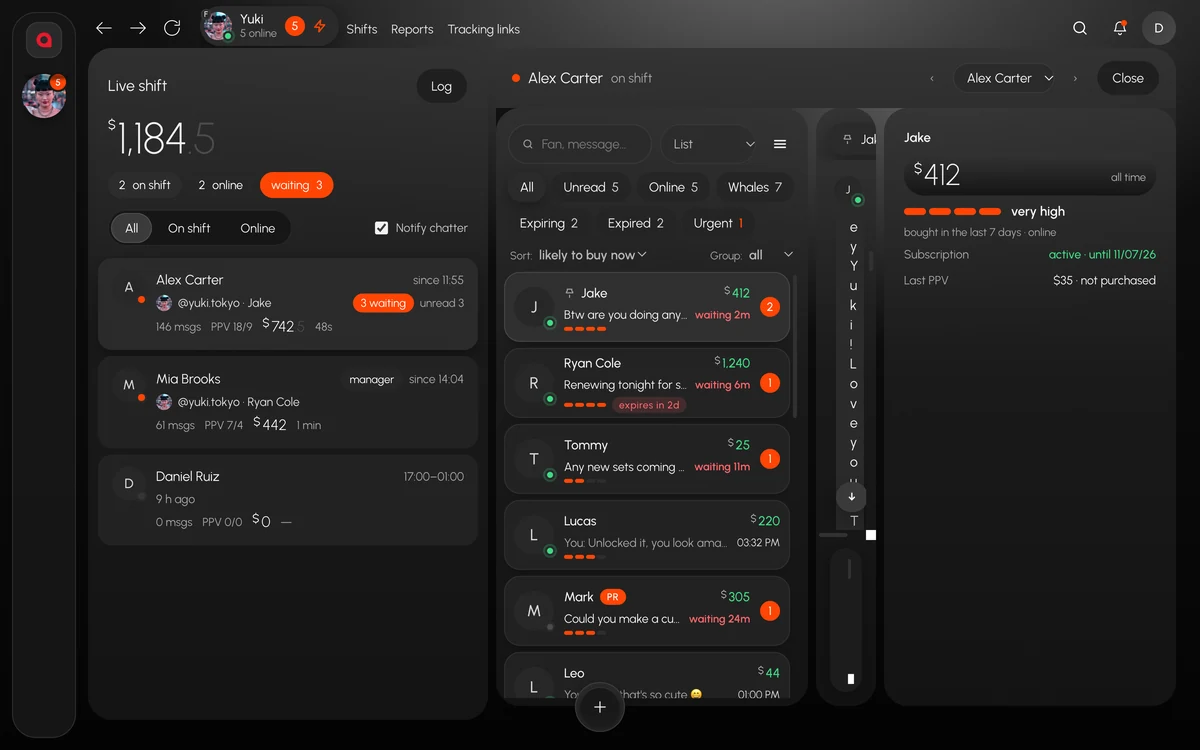
Chats of every model in one window
A chatter works ten conversations at once and has to see where the money is without clicking through each one. Look for the fan’s spend next to the chat, PPV history with bought and not bought, and one-click filters: unread, online, whales, expiring subscriptions. OnlyFans and Fansly models should sit in the same inbox.
The team and the shift, live
At any moment the tool should show who is on shift, who is online and who has fans waiting. Better still if a team lead can open a chatter’s screen and watch the work as it happens.
Payroll
Hours from clock-in and clock-out, sales per person, $/hour and commission. If the tool counts sales only, you will still build payroll by hand.
Numbers that explain a bad day
Revenue split into PPV, subscriptions and tips, PPV sent and bought per chatter, and reply speed. When a day drops, you want the reason: fewer PPV buys, slower replies or shorter shifts.
Account safety
Chatters should never see the model’s password. Each model needs her own session and proxy, new team devices should go through you, and one button should close access the day someone leaves. A leak filter should stop contacts and links in outgoing messages.
Eight questions before you pay
- Platforms. Does it cover all of yours: OnlyFans, Fansly, Fanvue, MYM?
- How the bill grows. A fixed price per model, or a price that rises with the account’s earnings? Work it out on your own models, starting with the top earner.
- The trial. How many days, and per model, per account or per agency?
- Passwords. Does the chatter see the model’s login? Can you cut access at once?
- The live shift. Can you watch a chatter’s work as it happens, or only read reports later?
- Payroll. Does it count hours, base pay and commission, or sales only?
- Proxies. In the price, or bought separately?
- Where it runs. Mac, Windows, a browser or an extension?
Five tools side by side
Competitor details come from their public pages: Infloww and OnlyMonster checked on 13 October 2026, Supercreator and FBuddy on 15 October, and prices checked again on 24 October at infloww.com/pricing, onlymonster.ai/pricing and supercreator.app/pricing. “Not listed” means we did not find it on those pages, not that it does not exist.
| Tool | Platforms | Price per month | Watch a chatter live | Payroll | Free trial |
|---|---|---|---|---|---|
| Infloww | OnlyFans, Fansly, Fanvue, MYM | From $40 per creator profile for OnlyFans and Fansly, from $50 for MYM and Fanvue | Not listed | Not listed | Yes, no card; length not stated |
| OnlyMonster | OnlyFans, Fansly, Fanvue, Reddit, LoyalFans, Telegram, Subs, TXT.com, Tango | OnlyFans: $30 to $250 per account by 30-day earnings; other platforms: $30 | Not listed | Not listed | 7 days for every new account |
| Supercreator | OnlyFans | CRM Lite free for up to 10 accounts; CRM Premium $15 to $249; Super AI $99 to $299 plus 5% of AI net sales | Live activity feed: messages, open chats, PPV sent | Commission per chatter, CSV / PDF export | 14 days, no card |
| FBuddy | Fansly | CRM plan $20 per creator, or $191.25 a year | Not listed | Not listed | 14 days, no card for first-time subscribers |
| Leeward | OnlyFans, Fansly | Base $25, Pro $50, Max $150 per model | Read-only view as they type, every viewing logged | Base, commission, $/hour, CSV export | 7 days for every connected model |
Where each tool is strong
Infloww
Four platforms: OnlyFans, Fansly, Fanvue and MYM. Infloww says more than 5,000 agencies use it, and every plan includes Messages Pro, Vault Pro, Smart Lists and an AI Copilot in beta. Each creator account gets its own proxy. Point by point: Leeward vs Infloww.
OnlyMonster
The widest platform list of the five, an open API with webhooks and the option to bring your own AI model. Shifts lock account access outside working hours, and Chatter Metrics show more than 25 numbers per chatter. OnlyMonster says 2,000+ teams in 100+ countries use it. See Leeward vs OnlyMonster.
Supercreator
The AI goes furthest: the AI chatter Izzy sells PPV and hands hot fans to a human, with copilots for messages, the inbox, the vault and pricing. There is a free plan for up to 10 accounts and tracking links with cost per subscriber. It covers OnlyFans only. See Leeward vs Supercreator.
FBuddy
The cheapest on Fansly, with creator tools: FYP and tag analytics, best times to post, post scheduling and livestream stats. The desktop CRM runs on macOS, Windows and Linux. It covers Fansly only. See Leeward vs FBuddy.
Leeward
OnlyFans and Fansly in one desktop app for macOS and Windows, a fixed price per model that doesn’t follow earnings, and a free team. The team lead watches the shift live, payroll comes from the timesheet, each model has a dedicated US proxy in the price, and sales and dropped sessions arrive in Telegram. The weak spot is platforms: OnlyFans and Fansly only.
Which one to pick
- Models on Fanvue or MYM: Infloww covers both, and OnlyMonster covers Fanvue.
- Reddit, LoyalFans, Telegram and other platforms in one tool: OnlyMonster.
- OnlyFans only, small accounts, and you want an AI chatter to do most of the work: Supercreator.
- Fansly only, and you mostly need FYP stats and post scheduling: FBuddy.
- OnlyFans and Fansly, and you want to see the shift live and run payroll in the same app: Leeward.
How to test fairly
All five have a free period. Run the same shift on the same models in two tools and compare at the end of the week: how fast fans got a first reply, PPV sent and bought per chatter, how many fans were still waiting when the shift ended, how long payroll took and how soon you learned about a dropped session. How to read these numbers in Leeward while the shift is on is in how to monitor chatters in real time.
Frequently asked questions
What is the best OnlyFans management software?
It depends on your platforms, account size and how you run the team. By their public pages, Infloww and OnlyMonster cover the most platforms, Supercreator goes furthest with AI on OnlyFans, FBuddy is the cheapest for Fansly only, and Leeward runs OnlyFans and Fansly with a live shift view and payroll from the timesheet.
Does management software need the model’s password?
Chatters shouldn’t get it. In Leeward the model signs in once, and chatters work in the app without seeing her login or password.
Can one tool run OnlyFans and Fansly?
Yes. By their public pages, Leeward, Infloww and OnlyMonster support both. Supercreator lists OnlyFans only and FBuddy Fansly only.
How much does OnlyFans management software cost?
From free, with Supercreator CRM Lite for up to 10 OnlyFans accounts, to $299 per account a month plus 5% of AI sales on Supercreator Super AI. Leeward is $25, $50 or $150 per model a month, and the team is free.
Every model you connect starts with 7 free days, and the team is free. Features and plans are on leewardworks.com; questions about connecting your agency go to [email protected].