
OnlyFans and Fansly in one CRM: how to run both platforms with one team
When an agency’s models live on two platforms, the team splits across two apps and two spreadsheets, and the team lead stops seeing where fans are waiting. Here is what Leeward shares between OnlyFans and Fansly, what only Fansly has, and how to set up the team so chatters don’t mix up models.
Where money is lost when the platforms live apart
As long as each platform has its own app, the agency loses money in places a report does not show.
- A chatter answers on an OnlyFans model while the fans of a Fansly model wait in the next window, and nobody notices.
- The team lead checks the shift in two places and still doesn’t know which chatter is on which model right now.
- The day’s revenue is put together from two exports, and a drop on one platform is spotted late.
- Pay is counted from two spreadsheets, and the sales of a chatter who worked on both platforms are easy to count twice or lose.
In one app the team lead answers these questions from one screen, and the owner sees the revenue of both platforms in one dashboard.
What both platforms share
In Leeward, OnlyFans and Fansly models are connected to one agency and work in one app for macOS and Windows.
- Inbox. Conversations with fans of all models on both platforms are gathered in one inbox. Model tabs are on top, and the “All” tab shows one shared feed. Each fan shows the total of his purchases.
- Team. The same positions, the same invites and one shift schedule. In “Shift now”, chatters on OnlyFans and Fansly models are on one screen.
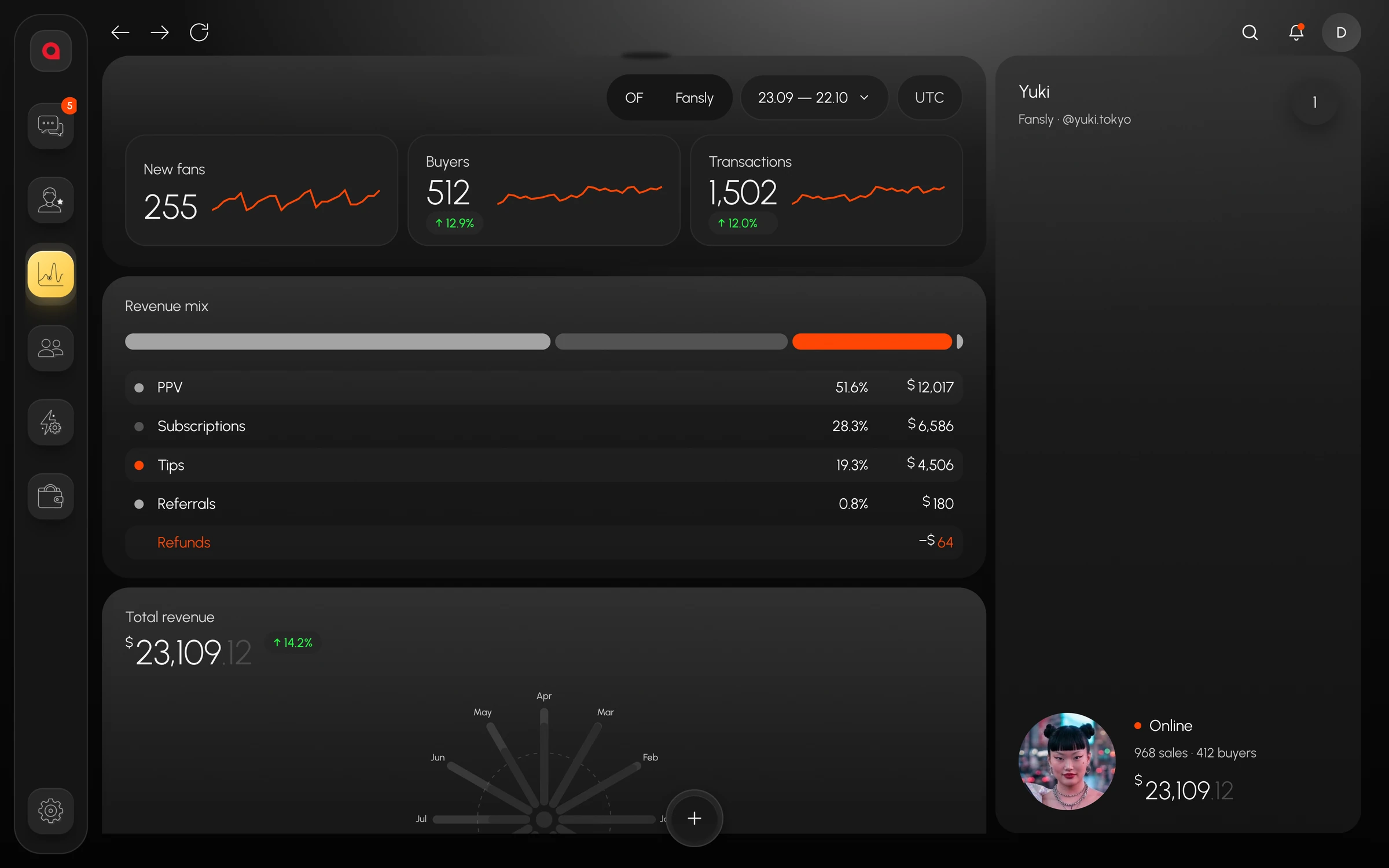
- Dashboard. New fans, buyers, transactions and the revenue mix, with an OF / Fansly platform switch at the top.
- Automation. Rules, the leak filter and Telegram notifications work on models of both platforms. The leak filter checks every outgoing message.
- Price. One price per connected model on either platform, and 7 free days for every new model.
On both platforms the fan card sits next to the chat: lifetime spend, PPV history marked “bought” and “not bought”, the subscription end date, lists and team notes. A chatter who moves from an OnlyFans model to a Fansly model reads the fan by the same fields.
What only Fansly has
Some features work only on Fansly models. It is worth knowing about them in advance if one chatter runs models on both platforms.
- FYP. The model’s stats in Fansly’s recommendation feed: FYP views, follower growth, the best tag, top media with a retention curve, the audience’s active hours.
- Read and unread. A chatter can mark a conversation as read or unread.
- Scheduled message. The message goes out later and cancels itself if the fan replies first.
- Mass messages. A Fansly mass message pauses between fans and skips fans who are in a live conversation and fans who already got this media.
Tell the team about these differences on day one. Otherwise a chatter will look on an OnlyFans model for a button that isn’t there and spend shift time on it.
How to set up the team across two platforms
It is easier to build the team around models and shifts: each model has its own platform, while people, positions and the schedule are shared.
- Assign models in the invite. A chatter sees only their own models, whatever platform they are on. You pick the position and the models when you invite them.
- Make positions by role. Chatter, team lead, newcomer. Permissions and the commission for pay are set in the position, and models are assigned to the person separately.
- Pin tabs. In “Inbox” a model can be pinned, found with ⌘⇧K or kept alone in “Focus” mode. Each model remembers its open conversations and filters.
- Split a big inbox. If several chatters work one model, its inbox can be split into 2–9 parts between them.
- Gather shifts into groups. In team chat a shift group has hours, models, a team lead and chatters, and it shows how many people are on shift and online right now.
In the shared inbox fans are sorted by who is likely to buy now, and the “Unread”, “Online”, “Whales” and “Expiring” filters open in one click. A chatter who runs models on both platforms starts the shift with the “All” tab and unread chats, so no fans are missed on either of them.
Money and numbers across two platforms
In the morning the owner opens the dashboard and switches the platform when one of them needs a separate look. The chatter ranking on the same screen shows who brings in more: by revenue, by PPV sold or by earnings per hour. “Reports” has a table by model: net, gross, purchases, buyers, average order, ARPPU, subscriptions, PPV, tips, referrals, refunds and other columns for 7, 30, 90 or 365 days, with CSV export.
Payroll is counted per person: hours, sales, $/hour, base, percentage, commission and total. The total is the base plus a percentage of sales at the position’s rate. It is a calculation: Leeward does not pay people. How to choose the rate and the percentage is covered in how to pay chatters.
The agency pays for each model separately. If one model is not paid, it gets locked, and the rest keep working. The history and data of a locked model stay.
Checklist: a second platform in the same agency
- Connect the second platform’s models to the same agency where the first ones already work.
- Assign the models to chatters. For new team members, models are picked right in the invite.
- Check the positions: who can see metrics and revenue, who is barred from mass messages, who has “Access only during shift”.
- Add the models to shift groups in team chat.
- Tell the team which chat features exist only on Fansly.
- After a week, compare the platforms on the dashboard with the OF / Fansly switch.
Leeward runs OnlyFans and Fansly models in one desktop app for macOS and Windows. The price is per model, see pricing. How Leeward compares with other Fansly CRMs is in best Fansly CRM tools for agencies.
Frequently asked questions
Do I pay separately for each platform?
No. You pay per connected model, the price is the same on either platform, and the team is free. Every new model starts with 7 free days.
Can one chatter run both OnlyFans and Fansly models?
Yes, if you assigned those models to them. Model tabs from both platforms sit in the same “Inbox”, and “Shift now” shows which model and which fan they are in right now.
How do models sign in to Leeward?
The model signs in to the platform once, and after that the login is stored inside Leeward in encrypted form. Each model works in her own browser with her own cookies and her own proxy, and the proxy is included in the price. The chatter never sees the model’s login or password.
Every model you connect starts with a 7-day free trial. Download Leeward, connect one model from each platform and look at them in one inbox.