How to pay OnlyFans chatters: base, commission and a timesheet that counts itself
Chatter pay is where many agencies lose time and trust at once. The owner rebuilds a spreadsheet every week, the chatter does his own maths, and the two numbers never match. The argument is rarely about the rate. It is about what counts as a sale and how many hours were really worked. This guide covers the common pay models, the rules worth writing down, and how Leeward counts payroll from the timesheet.
Three ways to pay a chatter
There is no single right OnlyFans chatter salary. Agencies use three models, and each fits a different team.
Commission only
The chatter gets a share of the sales they make. It is cheap to start with and rewards strong sellers. The risk: chatters chase quick PPV and neglect slow, long-term fans, and good people leave during a weak month for the model, because their income drops through no fault of their own.
Base plus commission
A fixed monthly amount plus a percentage of sales. This is the most common setup for agencies with steady shifts. The base keeps people through quiet weeks, the commission keeps them selling. The risk is a base that is too high relative to the model’s income, so the commission stops mattering.
Hourly
Pay per hour on shift. Simple and fair for trainees and for night shifts on small models where there is little to sell. The risk is obvious: hours get paid whether anyone sells or not, so you need to see what happens during those hours.
Many agencies mix them: hourly during training, then base plus commission once a chatter has proven they can sell. Whatever you choose, the rules below matter more than the exact rate.
The rules that prevent arguments
- Define a sale. In Leeward a chatter’s sale is a PPV that this chatter sent and the fan bought. It is concrete and easy to check in the chat history.
- Decide what about tips. By default tips do not count toward a chatter’s commission. A fan often tips the model, not the chatter, and tips can arrive hours later on someone else’s shift.
- Count hours from clock-in and clock-out, not from memory. If it is not in the timesheet, it was not a shift.
- Fix the pay period. Week, month or previous month, and stick to it.
- Put it in the contract. Rate, commission, what counts as a sale and when payment happens.
How Leeward counts payroll
In Leeward pay is set by positions. Each position has a base in $ per month and a commission in % of sales, and you assign a position to each team member. A senior chatter, a trainee and a manager can each have their own terms.
Chatters clock in and out with one button. The timesheet shows hours per person per day and in total for any period: this week, this month, last month or custom dates. Managers plan the week’s shifts in the same place.
The payroll sheet then puts it together for each person: position, hours, sales, $/hour, base, commission percentage, commission and total, with a total row for the team. Export to CSV takes one click.
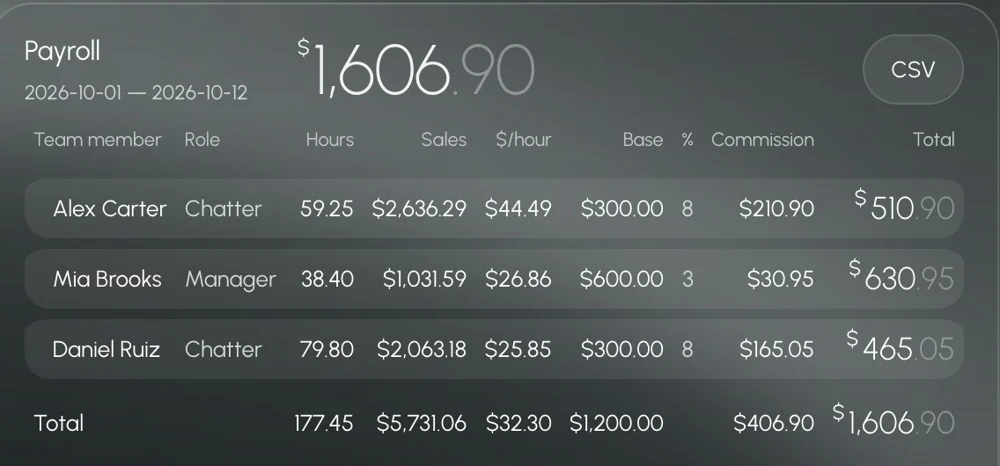
One honest note: Leeward counts what each person earned, but the payouts themselves happen outside the app, the way your agency already pays people.
Setting it up step by step
- Create positions. For example Trainee, Chatter and Senior chatter. Give each a base and a commission. A trainee can have a base and zero commission, a senior chatter a lower base and higher commission.
- Invite the team and assign positions. Each person joins with an invite link and sees only the models you choose.
- Plan the week. Put shifts into the schedule so everyone knows their hours.
- Make clock-in a habit. A shift starts with “Start shift” and ends with “End shift”. Managers check that this happens during the first days.
- Review $/hour weekly. It shows who turns hours into money. A chatter with many hours and low $/hour needs coaching or a different model, not a pay cut by surprise.
- Export at the end of the period. Download the CSV, check it, pay through your usual method.
Use the numbers for more than pay
Payroll data is also the best view of your team. If $/hour drops across everyone, the problem is probably the model’s traffic, not the chatters. If it drops for one person, look at their shifts live: see how to monitor chatters in real time. And when revenue falls on a specific day, check the reasons before blaming the team, our guide on why revenue drops walks through them.
Leeward runs OnlyFans and Fansly models in one desktop app for macOS and Windows. Plans are per model, see pricing.
Every model you connect starts with a 7-day free trial. Download Leeward, create two positions and let the next shift fill the timesheet.