
Rules and Telegram notifications: what an agency should set up first
A fan writes first, a subscription is running out, a whale comes online, and the chatter is busy with another conversation. Rules in Leeward fire on moments like these by themselves, and Telegram sends the owner what can’t be missed. Here is what to enable on day one.
How rules work
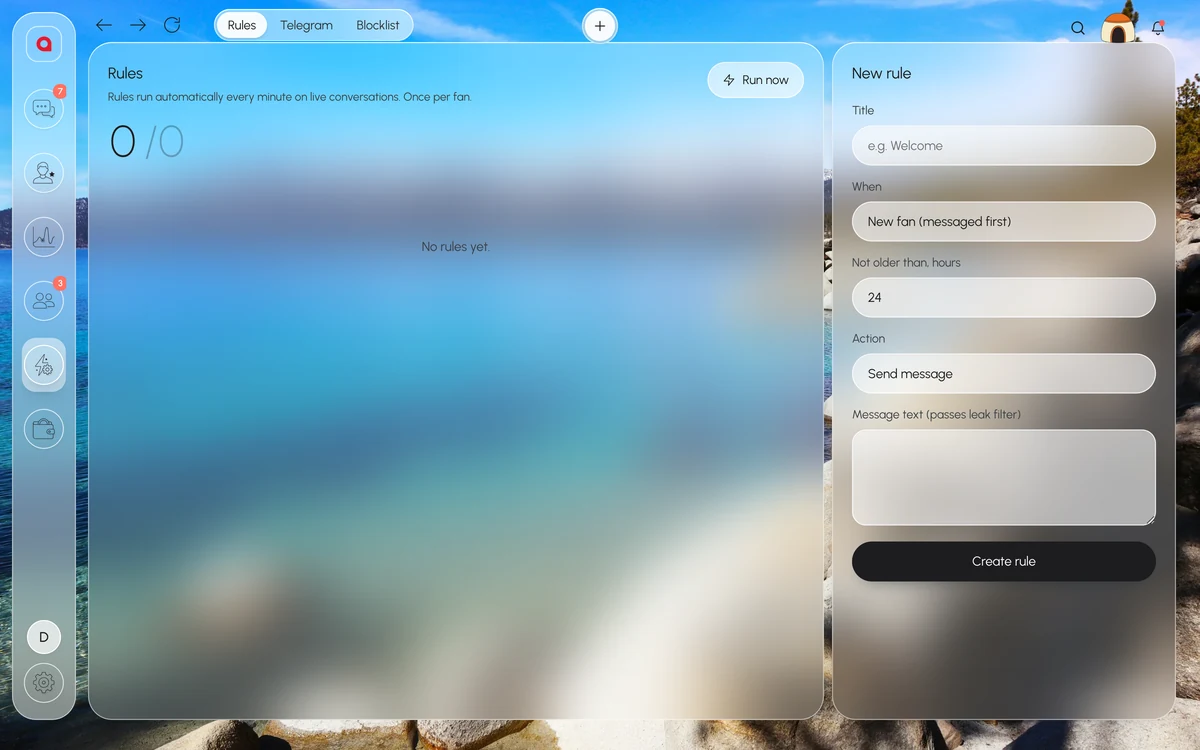
A rule is a condition and an action. You create it in “Automation → Rules”; after that it runs by itself and fires once per fan.
There are five conditions: a new fan wrote first, a fan has been silent for N hours, a subscription is expiring soon, a subscription has expired, a paying fan is online. The action is one of three: send a message, add a tag or notify a manager in Telegram.
The message text in a rule goes through the leak filter, just like chatters’ messages. If a forbidden word gets into the template, the fan won’t receive it.
Rules cover the moments when a person is busy with another conversation. Leave PPV sales and conversations with whales to people.
Five rules for day one
Start with the moments when a fan is ready to pay and the chatter doesn’t see him. It is easiest to turn the rules on in the order they appear in the list.
- A new fan wrote first → message. A short welcome in the model’s tone. The rule fires once per fan, so there are no repeats.
- Subscription expiring soon → notify a manager. A renewal is better handled by a live chatter: they see the fan’s spend and PPV history in the card.
- A paying fan is online → tag or notification. A fan who spends is online right now, and a person should answer him while he is here.
- A fan silent for N hours → message. For example, a fan has been silent for a day, and Leeward writes to him by itself.
- Subscription expired → message. A reason to bring the fan back while he still remembers the model.
Write rule texts like scripts: in the model’s tone, with no links or contacts. If you are unsure about the wording, paste it into the text check in the “Blacklist” and see whether the leak filter lets it through.
A rule and a mass message do different jobs. A rule catches a moment with one fan. A mass message sends one message to a segment: all fans, whales ($500+), paying, silent or new fans. A mass message has text variations {variant1|variant2}, the fan’s name {name}, a preview with the number of recipients and campaign history, and every message it sends also goes through the leak filter. Who on the team is barred from mass messages is decided by their position.
Telegram: what to send to your DMs
The agency connects its own Telegram bot in “Automation → Telegram”. If you don’t know where to start, open the AI administrator: it walks you through connecting Telegram step by step, and the final click is made by a person.
The bot sends to your DMs:
- “creator session lost”;
- leak filter violations: who and with which fan;
- sales;
- the daily report;
- a new team member, a new device, payment reminders, “model locked” and “low balance”.
Turn on dropped sessions, leak filter violations and the daily report first. These are expensive to learn about late: while a model is signed out nobody answers her fans, and a chatter who tried to send a contact may try again.
The other events also call for action, not just reading:
- “New device”. A team member is trying to sign in from a new computer and is waiting until the owner clicks “Approve” in “Members → Devices”. If you don’t recognise the computer, reject it, and nobody will sign in from it.
- “Model locked”. The model is not paid: chat, mass messages and data updates for it have stopped. History and data stay, and after payment the model works again.
- “Low balance”. Time to top up the agency balance; it is topped up with cryptocurrency. Then models won’t get locked in the middle of the week.
Thresholds, so the bot doesn’t turn into noise
If the bot writes about every purchase, the important things get lost among small sales, and a message about a dropped model is easy to scroll past. Thresholds for purchases and tips can be set: choose the amount below which you don’t need a sale in your DMs. Small sales still show on the dashboard, and the “today” number moves by itself.
After a week, look at which notifications you acted on and which you scrolled past, and adjust the thresholds.
An order for the first week, if you don’t want to turn everything on at once:
- On day one, connect the bot, turn on dropped sessions, leak filter violations and the daily report, and the ready-made blocks in the “Blacklist”.
- Next, set rules for new fans and for subscriptions that are about to expire.
- Once the team is used to it, add rules for paying fans who are online, for silent fans and for expired subscriptions.
- At the end of the week, adjust the purchase and tip thresholds.
Leak filter before the first shift
The leak filter is turned on before chatters start on a model. Forbidden words work together with the main switch. A message with a forbidden word doesn’t go out, it is marked “Blocked by leak filter”, and the violation is logged: who and with which fan. The owner can get these violations in Telegram.
There are ready-made blocks (websites, emails, phone numbers, crypto wallets and “Telegram protection”), your own words and recommended ones. The “Blacklist” keeps the block history and the list of violating fans. If the leak filter cuts an ordinary phrase, remove the extra word from your list and check the phrase again. The leak filter also works in mass messages and in automations. More in how to stop chatters from taking fans off-platform.
What to leave to team chat and the dashboard
Telegram notifications come to your DMs, while warnings for the whole shift are better kept in the Alerts channel of team chat. The owner turns the channel on, and it posts by itself that a shift starts in 15 minutes, that fans have been waiting for a reply for more than 30 minutes and that a model has disconnected.
The dashboard has its own alerts, in the Pro plan: a day that drops below normal and a forecast below the monthly goal. The owner sets the monthly goal. These alerts are handy to check in the morning together with the daily report from Telegram.
For your own reports there are webhooks and read-only API keys: models, revenue, transactions, tracking links. Leeward runs OnlyFans and Fansly models in one app for macOS and Windows, and the price is per model, see pricing.
Frequently asked questions
Can a rule fire twice on the same fan?
No. Rules run by themselves, and each one fires once per fan. The welcome to a new fan won’t go to him again.
Who gets the Telegram notifications?
They come to DMs from the bot the agency connected. For the whole shift there is the Alerts channel in team chat: shift in 15 minutes, fans waiting more than 30 minutes, model disconnected.
Does the leak filter check messages sent by rules?
Yes. The leak filter works in chat, in mass messages and in automations. A message with a forbidden word won’t go out, and the violation is logged.
Every model you connect starts with a 7-day free trial. Download Leeward, connect the bot and set up your first rule for new fans.